-
Alphabet Soup for Kids
-
BURGER CATCH
-
 Rolly Legs 3D
 -
Amazing Fruit Pictures For Kids
-
Cooking Restaurant Kitchen
-
 Slope Extra
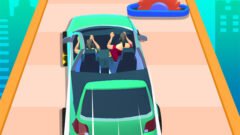






Driver Run 3D
-
Rating:0/5 (0 votes)
-
Developer:bharat
-
Platforms:Browser (Desktop, Mobile, Tablet)
-
Release Date:September 28, 2026
-
Last Update:October 4, 2026
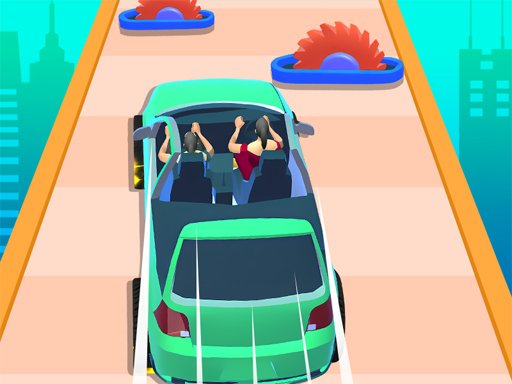
Begin a wonderful car arcade running game. In the Driver Run 3D, not only do you have to run, but you also have to collect car parts. Assemble your car and race your way to the finish line. As a top racer, you must move flexibly on the platform. Collect wheels, body, engine, and other parts to complete your dream car. But be careful of obstacles.
Mouse click or tap to play
Driver Run 3D Overview & Gameplay Breakdown
Driver Run 3D is an electrifying hyper-casual arcade runner that seamlessly blends parkour platforming with dynamic automotive engineering mechanics. In this fast-paced 3D title, players sprint along vibrant, suspended raceway tracks with a primary objective: gather modular vehicle components scattered across the track to construct a high-performance machine from scratch. Starting as an unequipped runner or bare chassis, you must navigate treacherous platforms while hoovering up vital parts including rubber tires, reinforced chassis frames, tuned sports car engines, aerodynamic spoilers, and sleek body panels. Every item you snatch immediately integrates onto your rig, transforming your basic setup into an elite racing supercar. The journey to the finish line tests your spatial agility as you dodge crushing barriers, hazard gates, and speed-sapping traps that threaten to strip away your hard-earned modifications. Crossing the final checkpoint shifts the action into an explosive high-speed sprint where your assembled vehicle’s quality determines your end-of-stage multiplier bonus and score payout.
Mastering Driver Run 3D: Advanced Strategies & Winning Tips
To dominate the leaderboards in Driver Run 3D, precision pathfinding and split-second lane discipline are paramount. First, prioritize collecting matched modular components rather than blindly swiping across the course; securing vital core pieces like dual-axle wheels and advanced engine blocks yields exponential performance boosts over cosmetic attachments. Always survey the course two steps ahead to identify incoming obstacle clusters, swinging pendulums, and destructive barrier gates. Striking an obstacle instantly dislodges your assembled components, devolving your car into a fragile chassis and drastically reducing your terminal speed. When navigating split pathways or multiplier arches, evaluate the risk versus reward: higher tier car parts frequently lie on narrower, hazard-laden ledges. Master subtle micro-adjustments instead of erratic wide sweeps to preserve momentum through sharp chicanes. Finally, carry maximum upgrade momentum into the finish line straightaway to guarantee you blast through top-tier multiplier zones for massive coin jackpots.
Key Features & Unique Mechanics in Driver Run 3D
The hallmark attraction of Driver Run 3D is its real-time automotive assembly engine, where collected parts snap seamlessly into place, visually evolving your runner into a luxury racing machine. As you complete levels, earned currency unlocks custom vehicle blueprints, flashy neon paint schemes, and durable base attributes that improve handling stability and part attraction radius. Strategically placed nitro boost pads, magnet bonuses, and positive multiplier gates drastically accelerate assembly phases, while rotating saw blades and barricades enforce tight risk-reward decision-making. These evolving difficulty curves and progressive upgrade trees ensure satisfying replayability across dozens of handcrafted obstacle tracks.
Driver Run 3D Controls & Shortcut Guide
- Mouse Click & Drag (Left / Right): Steer your runner or vehicle sideways across platform lanes to collect parts and evade obstacles.
- A / D Keys: Alternative keyboard steering controls to weave left and right through narrow platform gaps.
- Left / Right Arrow Keys: Secondary directional controls for adjusting lateral lane positioning with tactile responsiveness.
- Spacebar / Click Hold: Engage burst nitro acceleration or maintain forward running velocity through finishing speed runs.
- P or Esc: Quickly pause the action to review stage progress, adjust audio settings, or restart the level.
Related Games
-
 Coffee Run 3D
 -
 Number Run 3D Casual Game
 -
 Vemon Run 3D
 -
 Makeover Run 3D
 -
 Restaurant Simulator: Burgers & Pizza
 -
 2 Player Games Kids Kitchen
 -
 Dream Kitchen
 -
 Papas Burger Cook
 -
 Pizza Now!
 -
 Falafel Master
 -
 Sara’s Cooking Class: Spooky Food
 -
Kitchen Sorting
-
Pizza Maker – Cooking Games For Kids
-
Burger Cafe – Cooking Games For Kids
-
Mahjong Connect Cookware
-
Paws & Pals Diner
-
Purrfect Scoops
-
Restaurant Simulator: Burgers & Pizza