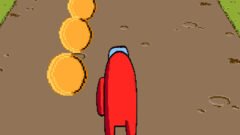





Battery Run 3D
-
Rating:0/5 (0 votes)
-
Developer:bharat
-
Platforms:Browser (Desktop, Mobile, Tablet)
-
Release Date:September 28, 2026
-
Last Update:October 9, 2026
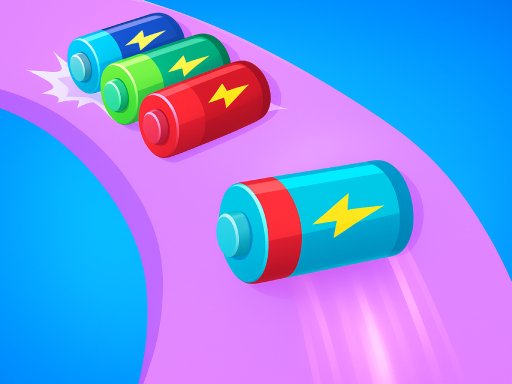
Dash as a tiny battery, avoid hazards, collect energy to charge up, and reach the finish to power the device! Fast lanes and quick reactions are the key.
Mouse click or tap to play
Getting Charged: Introduction and Origins of Battery Run 3D
Battery Run 3D is an addictive hyper-casual obstacle runner that took mobile app stores and web gaming portals by storm upon its release in early 2022. Published by mobile giant VOODOO, the title quickly gained millions of downloads by putting an electrifying twist on the popular runner genre. Instead of guiding human athletes or quirky mascots, players control an energetic AA battery zipping down vibrant tracks. With bright 3D visuals, responsive physics, and satisfying sound design, the game tasks you with stacking together a snaking train of batteries to power up electronics waiting at the finish line.
How to Play and Essential Strategies
The rules of Battery Run 3D are straightforward, making it instantly accessible for casual gamers of all ages. Your battery automatically propels forward along floating pathways. As you race, your primary goal is to gather loose batteries, expand your train, and avoid anything that could drain or destroy your power supply.
Core Objectives
To finish a course successfully, you must retain at least one charged battery until the goal line. Once you cross the finish line, your collected batteries slot into a succession of idle gadgets—such as flashlights, handheld consoles, and remote-controlled cars. The deeper your battery chain reaches down the multiplier track, the more bonus coins and gems you earn to unlock upgrades.
Beginner-Friendly High Score Tips
Maximizing your score requires a balance of cautious steering and calculated risk:
Look Ahead, Not Down: The battery line extends behind you, making fast directional snaps risky. Keep your eyes focused midway down the track so you can react to spinning blades and narrow walkways before it is too late.
Pick the Right Gates: Always steer toward positive math gates (such as +5 or ×2) and steer clear of red subtractor barriers that strip away your hard-earned power cells.
Clear Toys Wisely: Inactive toys often sit directly in the main lane. Running into them plugs in a few of your batteries to bring the toy to life and clear the path. If a side lane is open, swerve around them to preserve your batteries for the end-of-level multiplier.
Exciting Game Features and Hazards
Battery Run 3D stays fresh with dynamic course elements and satisfying progression mechanics:
Gadgets and Appliances: The track is filled with interactive items waiting for a charge. You will power everything from small alarm clocks and game controllers to roaring toy robots and race cars.
Devastating Hazards: Watch out for spinning buzzsaws, stomping pistons, shredders, and open chasms. Clipping a hazard instantly cuts away any trailing batteries caught in the blast.
Super Battery Starts: Between runs, spend earned gems to upgrade your starting battery count or unlock super-charged batteries, giving you an immediate cushion for tougher late-game tracks.
Exact Game Controls
Whether playing on a smartphone or through a desktop web browser, steering your battery line is seamless and intuitive:
- Mobile (Touchscreen): Tap and drag your finger left or right anywhere on the screen to steer laterally.
- Desktop Mouse: Click and hold the Left Mouse Button, then drag the mouse left or right to slide across lanes.
- Keyboard (A / D Keys): Press A to steer left and D to steer right on supported browser ports.
- Keyboard (Arrow Keys): Press the Left Arrow to shift left and the Right Arrow to shift right.
What makes Google Snake so fun is the contrast between its approachable rules and the mounting tension of each match. Players navigate an ever-growing serpent around a checkered board, gathering fresh fruit while avoiding collisions. Thanks to responsive controls, a plethora of custom gameplay modifiers, and multiple board configurations, it works equally well as a casual five-minute break or an intense high-score competition.
How to Play Google snake
The rules of Google Snake are straightforward, but reaching a top score demands composure and foresight. Your primary goal is to guide the snake toward food items—most commonly red apples—scattered across the grid. Every time your snake eats a piece of fruit, your score increases and your body grows by one tail segment.
A round ends the moment your snake crashes into a boundary wall or bites into its own body. As your length increases, open board space shrinks, making impulsive turns risky. To build massive scores, practice the “perimeter coil” or “zigzag” strategy: trace along the outer walls and sweep the board in tight, uniform rows. This method keeps your head safely pointed toward open escape routes and prevents you from trapping yourself inside your own loops.
Controls
Google Snake supports smooth, latency-free inputs across both desktop setups and touchscreens:
- Arrow Keys (Desktop): Press Up, Down, Left, or Right to direct the snake.
- WASD Keys (Desktop): Press W (Up), A (Left), S (Down), and D (Right) for standard alternative movement.
- Swipe Gestures (Mobile/Tablet): Swipe across the screen in your desired direction to initiate turns.
- Spacebar: Press the Spacebar to pause and resume active gameplay on desktop browsers.
Features
Before launching a run, clicking the gear icon unlocks a surprising array of official gameplay modifiers, visual options, and board settings:
- Creative Game Modes: Google includes more than 20 distinct modes, such as Portal (eating fruit teleports your snake across the map), Cheese (creates gaps in your tail to pass through safely), Peaceful (removes fail states entirely), Twin (simultaneously controls two snakes), and Borderless (lets you loop from one edge of the screen to the opposite side).
- Adjustable Map Sizes: Tailor the play area to your preference by selecting Small, Normal, or Large grid dimensions.
- Speed Tiers: Adjust the pace between Slow (turtle), Normal (rabbit), and Fast (lightning bolt) depending on your comfort level.
- Alternative Food Spawns: Swap standard apples for bananas, cherries, pineapples, watermelons, or roll dice modes that spawn multiple fruits at once.
- Snake Customization: Personalize your serpent with vibrant color palettes and visual styles to keep every session fresh.
FAQ
Explore answers to common questions about Google Snake mechanics, history, and secret modes below.Run 3 is a legendary 3D platformer and endless runner that catapults players into the vast depths of outer space. Originally created by independent developer Joseph Cloutier (known in the gaming community as Player_03) and released in 2014, the game quickly cemented itself as one of the most iconic web browser titles of all time. Players step into the shoes of a quirky, one-eyed alien sprinting through decaying architectural tunnels floating amidst the stars.
What makes Run 3 so endlessly captivating is its brilliant gravity-defying gimmick. As you steer toward the tunnel walls, the entire universe rotates beneath your feet, turning sheer drops into solid running ground. Combining fast-paced reflexes with hypnotic, floating physics and a mesmerizing soundtrack, it delivers a deeply satisfying loop of “just one more run” gameplay.
How to Play run 3
The objective of Run 3 is simple yet demanding: survive the journey across deep-space corridors without tumbling into the dark vacuum of space. Your alien character sprints forward automatically. Your task is to steer from side to side and jump across dangerous abysses, brittle platforms, and tricky obstacles.
To master the game and beat difficult levels, use these core strategies:
- Rotate the Room: Moving onto a sidewall causes the entire tunnel to shift 90 degrees, turning that wall into the new floor. Use this mechanic to bypass massive floor gaps by switching to a safer lane.
- Control Your Jump Height: Tapping the jump key creates a short hop, while holding it down delivers a sustained, high-arcing leap. Modulating your jump distance prevents overshooting narrow platforms.
- Watch for Crumbling Tiles: Dark gray tiles dislodge and crumble within fractions of a second after you touch them. Never hesitate on these surfaces—leap off them immediately or route around them altogether.
- Match the Runner to the Route: If a stage requires high jumps across cavernous openings, switch to characters like the Lizard. For speed and distance, pick the Skater.
Controls
Run 3 uses straightforward keyboard bindings designed for quick, responsive maneuvering:
- Left Arrow / A: Steer left (rotates the tunnel counterclockwise).
- Right Arrow / D: Steer right (rotates the tunnel clockwise).
- Up Arrow / Spacebar / W: Jump (hold for maximum leap duration).
- P / Esc: Pause game and bring up the menu.
- R: Quick-restart the current level or run.
Features
Run 3 expands far beyond a barebones runner, offering depth and customization across several distinct modes and mechanics:
- Dual Game Modes: Explore Mode features a massive, branching galaxy map with over 300 campaign levels and cutscene lore. Infinite Mode is a procedurally generated gauntlet where you push for top leaderboards while collecting glowing Power Cells.
- Diverse Playable Aliens: You can unlock 10 distinct characters, including the balanced Runner, the high-flying Lizard, the hyperactive Bunny, the floating Child, the bridge-building Pastafarian, and the clone-spawning Duplicator.
- Hazardous Tunnel Gimmicks: Navigate through crumbling tiles, conveyor belts, low-gravity chambers, ramps, and sudden twists in deep space.
- In-Game Shop: Spend collected Power Cells to unlock specialized characters and bonus costumes without real-money transactions.
FAQ
How to play run 3?
Who developed run 3?
How do you unlock new characters in Run 3?
What is the difference between Explore Mode and Infinite Mode?
Got questions about navigating the cosmos in Run 3? Check out the quick answers below to sharpen your cosmic running skills.